> ## Documentation Index
> Fetch the complete documentation index at: https://finallayer.com/docs/llms.txt
> Use this file to discover all available pages before exploring further.
# What is FitB?
> Fill in the Blanks (FitB) is used when creating posts from Your Story ideas. Simply answer a few strategic prompts about your story, and it will generate compelling content.
## What Is FitB?
FitB is an enhanced storytelling feature that guides you through creating authentic LinkedIn posts using questions. Instead of describing your entire story at once, FitB breaks it down into focused prompts about your experience, audience, and key takeaways, then Create a personalized post that sounds genuinely like you.
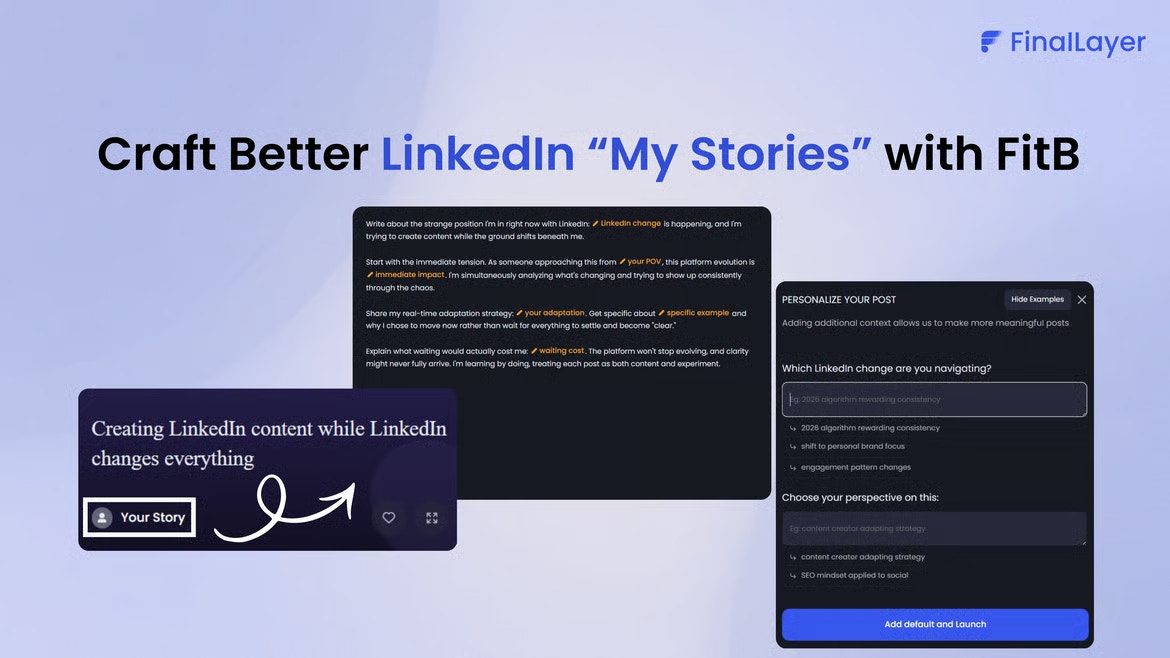 ## How to Access FitB
Select a post idea with the **"Your story"**
A FitB prompt will appear with questions
Provide the inputs to create post
## Common Questions
**Q: Do I answer every prompt?**\
A: No. You have the flexibility to skip any prompts that don't align with your story or experience.
**Q: How long should answers be?**\
A: We recommend keeping your answers concise—typically 1 to 3 sentences per prompt.
**Q: Can I edit after generating?**\
A: Absolutely. You are encouraged to review your generated content carefully and make any refinements needed.
**Q: Will it sound like me?**\
A: Yes. The content will authentically reflect your unique voice and perspective. It is generated based on both your direct experiences and your responses to the FitB prompts.
## How to Access FitB
Select a post idea with the **"Your story"**
A FitB prompt will appear with questions
Provide the inputs to create post
## Common Questions
**Q: Do I answer every prompt?**\
A: No. You have the flexibility to skip any prompts that don't align with your story or experience.
**Q: How long should answers be?**\
A: We recommend keeping your answers concise—typically 1 to 3 sentences per prompt.
**Q: Can I edit after generating?**\
A: Absolutely. You are encouraged to review your generated content carefully and make any refinements needed.
**Q: Will it sound like me?**\
A: Yes. The content will authentically reflect your unique voice and perspective. It is generated based on both your direct experiences and your responses to the FitB prompts.